 JawAtlas
How a panoramic view is reconstructed from a CBCT scan
How CBCT software builds a panoramic image from a curve traced along the dental arch, what slab thickness does, and how cross-sections are used.
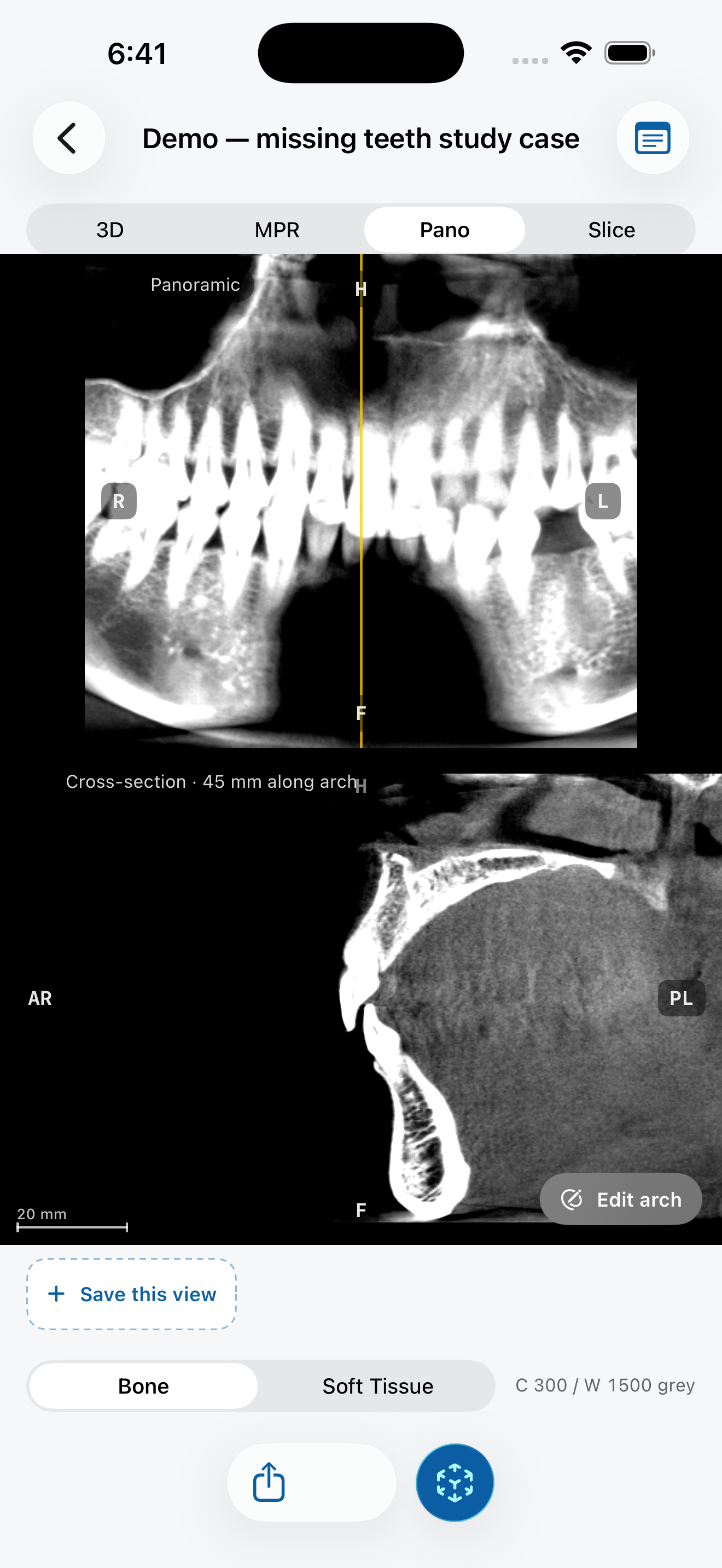
A conventional panoramic radiograph (OPG) is taken with a rotating tube and detector that keep one curved layer of the jaw in focus. A CBCT scan already contains the whole jaw in 3D, so software can build a similar view after the scan, along any curve you choose. This is called a panoramic reconstruction, or more formally a curved planar reformation.
Step 1: trace the arch
On an axial slice at the level of the roots, you place points along the middle of the dental arch, from one side to the other. The software joins them into a smooth curve. Every column of the panoramic image is sampled along a short line that crosses this curve at a right angle.
The curve matters. If it runs too far to the cheek side or the tongue side, teeth look narrower or wider than they are and can blur out. Re-tracing the curve is a normal part of the workflow, not a mistake.
Step 2: choose a slab thickness
Instead of sampling a single thin layer, the software averages a slab of a few millimetres around the curve. A thicker slab looks smoother and more like a familiar OPG, but small details are averaged away. A thinner slab is sharper but noisier and more sensitive to where you drew the curve.
Step 3: read cross-sections
A panoramic view flattens the arch, so it cannot show the cheek-to-tongue dimension. For that you use cross-sections: slices perpendicular to the curve at a chosen point. Moving a scout line along the pano steps a cross-section through the jaw, which is how bone width and the position of structures such as the mandibular canal are studied.
How it differs from a conventional OPG
- It follows the convention of a conventional OPG: the patient's right is on the viewer's left.
- There are no ghost images from structures on the opposite side, because the image is computed from the volume instead of projected through it.
- Magnification is not a factor in the same way, because the image is sampled from a measured 3D volume.
- The result depends entirely on the curve you trace, so two people can get different-looking panos from the same scan.
Try it in JawAtlas
On the demo scan, tap points along the arch on an axial slice. JawAtlas builds the panoramic view on the GPU; drag the scout line across it to step a cross-section through the jaw.
Get JawAtlas free on the App StoreThis guide is for education and training. JawAtlas is not a medical device and must not be used for diagnosis, treatment planning or any clinical decision.